# Delta Mining Company Network
Table of Contents
Project Overview
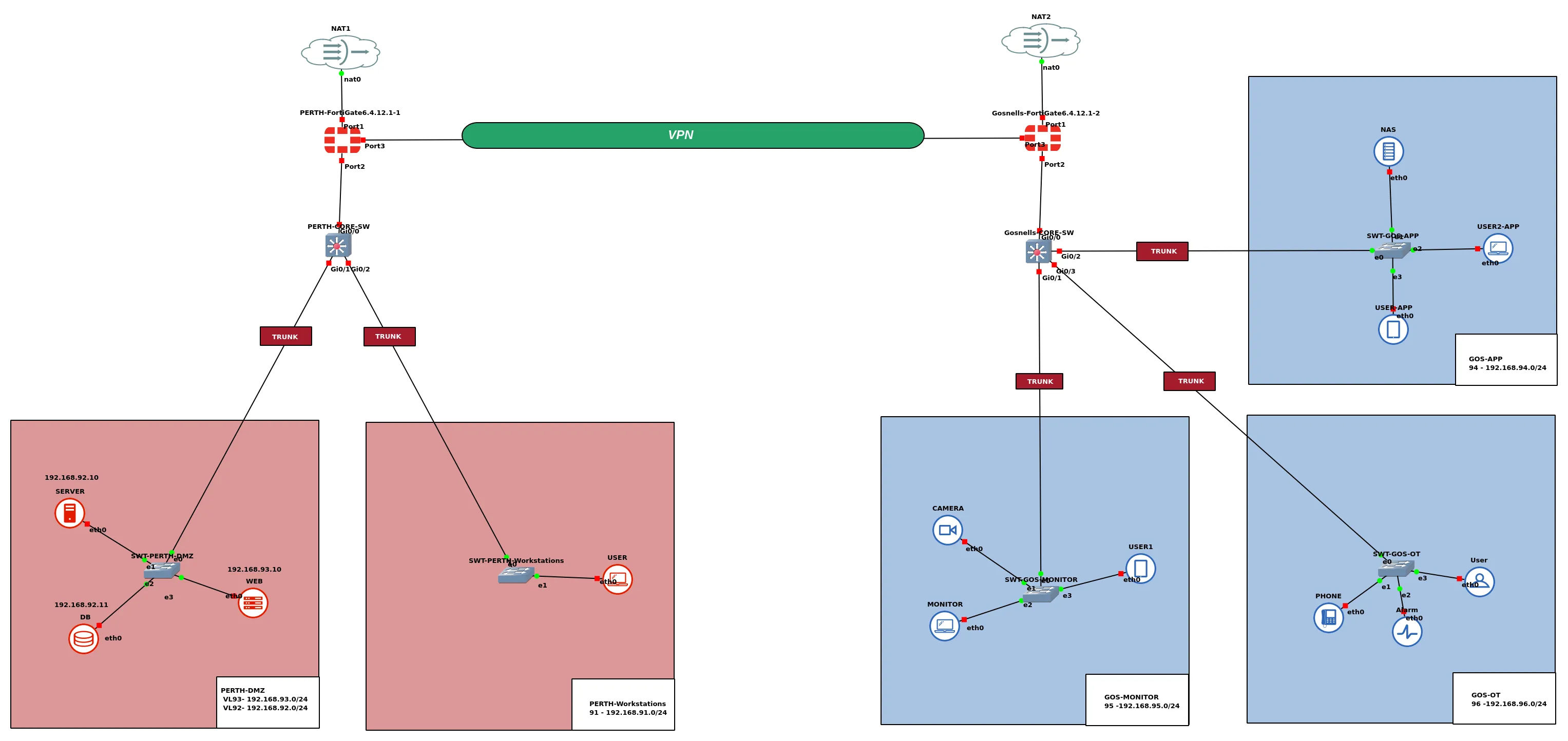
This project implements a virtual enterprise network for Delta Mining Company (DMC), modelled in GNS3. Two operational sites — Perth CBD and Gosnells Quarry — are connected over a site-to-site IPSec VPN between FortiGate firewalls, with independent Internet breakout at each location.
Each site uses a Cisco core switch for VLAN trunking and a FortiGate 6.4.12 as the security gateway. End hosts are segmented into purpose-specific VLANs covering workstations, servers, DMZ services, application systems, CCTV monitoring, and OT devices. Firewall zones enforce controlled traffic between segments before it reaches the WAN or the remote site.
Network Architecture
The design follows a dual-site layout aligned with DMC’s Perth CBD headquarters and Gosnells Quarry operations. Perth hosts internal servers, a database, and a DMZ web tier; Gosnells hosts application workloads, CCTV monitoring, and OT systems including phones and alarm panels. Cross-site communication is limited to matched VLAN pairs over the VPN tunnel.
Perth CBD
| Device | Role |
|---|---|
PERTH-FortiGate6.4.12.1-1 | Perimeter firewall, VLAN routing, NAT, IPSec VPN |
PERTH-CORE-SW | Layer-2 trunking for VLANs 91–93 |
SWT-PERTH-Workstations | Access switch for end-user workstations |
SWT-PERTH-DMZ | Access switch for servers and web services |
Gosnells Quarry
| Device | Role |
|---|---|
Gosnells-FortiGate6.4.12.1-2 | Perimeter firewall, VLAN routing, NAT, IPSec VPN |
Gosnells-CORE-SW | Layer-2 trunking for VLANs 94–96 |
SWT-GOS-APP | Application and NAS hosts |
SWT-GOS-MONITOR | Cameras and monitoring workstations |
SWT-GOS-OT | OT devices — phones, alarms, and control endpoints |
WAN and VPN Links
| Link | Perth | Gosnells |
|---|---|---|
| Internet (NAT) | port1 → 192.168.122.223 | port1 → 192.168.122.152 |
| Site-to-site VPN | port3 → 200.10.10.2 | port3 → 200.10.10.3 |
IP Addressing and VLANs
| VLAN | Name | Subnet | Site | Purpose |
|---|---|---|---|---|
| 91 | PERTH-Workstations | 192.168.91.0/24 | Perth | End-user workstations |
| 92 | PERTH-SERVER | 192.168.92.0/24 | Perth | Internal servers and database |
| 93 | PERTH-DMZ | 192.168.93.0/24 | Perth | Public-facing web services |
| 94 | GOS-APP | 192.168.94.0/24 | Gosnells | Application servers and NAS |
| 95 | GOS-MONITOR | 192.168.95.0/24 | Gosnells | CCTV and monitoring systems |
| 96 | GOS-OT | 192.168.96.0/24 | Gosnells | Operational technology devices |
VPN Subnet Pairing
Traffic between sites is routed through IPSec phase-2 selectors that map each Perth VLAN to its Gosnells counterpart:
| Perth subnet | Gosnells subnet | Traffic type |
|---|---|---|
| 192.168.91.0/24 (Workstations) | 192.168.94.0/24 (APP) | User ↔ application access |
| 192.168.92.0/24 (SERVER) | 192.168.95.0/24 (MONITOR) | Server ↔ monitoring |
| 192.168.93.0/24 (DMZ) | 192.168.96.0/24 (OT) | Web/DMZ ↔ OT systems |
Asset Register — Perth CBD
| VLAN | Network | Device / Role | IP Address |
|---|---|---|---|
| 91 | 192.168.91.0/24 | Workstation 1 | 192.168.91.10 |
| 92 | 192.168.92.0/24 | Server | 192.168.92.10 |
| 92 | 192.168.92.0/24 | Database | 192.168.92.11 |
| 93 | 192.168.93.0/24 | Web Server | 192.168.93.10 |
| — | 200.10.10.0/24 | WAN (FortiGate port3) | 200.10.10.2 |
Default gateways for VLANs 91–93 are the FortiGate sub-interfaces at .1 in each subnet (e.g. 192.168.91.1).
Asset Register — Gosnells Quarry
| VLAN | Network | Device / Role | IP Address |
|---|---|---|---|
| 94 | 192.168.94.0/24 | USER-APP | 192.168.94.10 |
| 94 | 192.168.94.0/24 | NAS / App Host | 192.168.94.11 |
| 94 | 192.168.94.0/24 | USER2-APP | 192.168.94.12 |
| 95 | 192.168.95.0/24 | User | 192.168.95.10 |
| 95 | 192.168.95.0/24 | Camera | 192.168.95.11 |
| 95 | 192.168.95.0/24 | Monitor | 192.168.95.12 |
| 96 | 192.168.96.0/24 | User | 192.168.96.10 |
| 96 | 192.168.96.0/24 | Alarm / OT Device | 192.168.96.11 |
| 96 | 192.168.96.0/24 | Phone | 192.168.96.12 |
| — | 200.10.10.0/24 | WAN (FortiGate port3) | 200.10.10.3 |
Default gateways for VLANs 94–96 are the FortiGate sub-interfaces at .1 in each subnet (e.g. 192.168.94.1).
Perth Site Configuration
Core Switch
The Perth core switch creates the three site VLANs and trunking toward the FortiGate and access switches.
!192.168.91.0/24 - vlan91 - PERTH-Workstations!192.168.92.0/24 - vlan92 - PERTH-SERVER!192.168.93.0/24 - vlan93 - PERTH-DMZ!show vlan brief!show vlan id <vlan-id>!show interfaces trunk
enable
conf terminal
hostname PERTH-CORE-SW
vlan 91    name PERTH-Workstations    exit
vlan 92    name PERTH-SERVER    exit
vlan 93    name PERTH-DMZ    exit
 interf range g0/0-2  switchport trunk encapsulation dot1q  switchport mode trunk  switchport trunk allow vlan 91,92,93  exit
write
FortiGate Firewall
The Perth FortiGate terminates VLAN sub-interfaces on port2, groups them into the PERTH-ZONE security zone, and applies firewall policies for intra-site and Internet-bound traffic. port3 carries the IPSec tunnel to Gosnells.
!192.168.91.0/24 - vlan91 - PERTH-Workstations!192.168.92.0/24 - vlan92 - PERTH-SERVER!192.168.93.0/24 - vlan93 - PERTH-DMZ!get system interface!port1 ip:192.168.122.223
config system interface    edit port1    set allowaccess http https ping snmp ssh telnetend
config router static    edit 1    set gateway 192.168.122.1    set dst 0.0.0.0 0.0.0.0    set device port1    nextend
config system interface    edit "vlan91"        set vdom "root"        set interface "port2"        set alias "PERTH-Workstations"        set vlanid 91        set ip 192.168.91.1 255.255.255.0        set allowaccess http https ping snmp ssh telnet    nextend
config system interface    edit "vlan92"        set vdom "root"        set interface "port2"        set alias "PERTH-SERVER"        set vlanid 92        set ip 192.168.92.1 255.255.255.0        set allowaccess http https ping snmp ssh telnet    nextend
config system interface    edit "vlan93"        set vdom "root"        set interface "port2"        set alias "PERTH-DMZ"        set vlanid 93        set ip 192.168.93.1 255.255.255.0        set allowaccess http https ping snmp ssh telnet    nextend
config system zone    edit "PERTH-ZONE"        set intrazone deny        set interface "vlan91" "vlan92" "vlan93"        set description "Zone for Perth site VLANs: Workstations, Servers, and DMZ"    nextend
config firewall policy    edit 0        set name "PERTH-Workstations-to-Servers"        set srcintf "PERTH-ZONE"        set dstintf "PERTH-ZONE"        set srcaddr "all"        set dstaddr "all"        set action accept        set schedule "always"        set service "ALL"        set nat enable    nextend
config firewall policy    edit 1        set name "PERTH-to-Internet"        set srcintf "PERTH-ZONE"        set dstintf "port1"        set srcaddr "all"        set dstaddr "all"        set action accept        set schedule "always"        set service "ALL"        set nat enable        set logtraffic all    nextend
config system interface    edit "port3"        set vdom "root"        set alias "WAN_GOS"        set role wan        set mode static        set ip 200.10.10.2 255.255.255.0        set allowaccess ping https ssh    nextend
config vpn ipsec phase1-interface    edit "VPN_PTH_GOS"        set interface "port3"        set ike-version 2        set peertype any        set net-device enable        set proposal des-sha1        set dhgrp 14        set remote-gw 200.10.10.3        set psksecret "FortiGateVPN123"    nextend
config vpn ipsec phase2-interface    edit "P2_91_94"        set phase1name "VPN_PTH_GOS"        set proposal des-sha1        set dhgrp 14        set src-subnet 192.168.91.0 255.255.255.0        set dst-subnet 192.168.94.0 255.255.255.0    next
    edit "P2_92_95"        set phase1name "VPN_PTH_GOS"        set proposal des-sha1        set dhgrp 14        set src-subnet 192.168.92.0 255.255.255.0        set dst-subnet 192.168.95.0 255.255.255.0    next
    edit "P2_93_96"        set phase1name "VPN_PTH_GOS"        set proposal des-sha1        set dhgrp 14        set src-subnet 192.168.93.0 255.255.255.0        set dst-subnet 192.168.96.0 255.255.255.0    nextend
config router static    edit 0        set dst 192.168.94.0 255.255.255.0        set device "VPN_PTH_GOS"    next    edit 0        set dst 192.168.95.0 255.255.255.0        set device "VPN_PTH_GOS"    next    edit 0        set dst 192.168.96.0 255.255.255.0        set device "VPN_PTH_GOS"    nextend
End-Host Network Settings
Each Perth VLAN host uses its FortiGate sub-interface as the default gateway.
iface eth0 inet static address 192.168.91.10 netmask 255.255.255.0 gateway 192.168.91.1 up echo nameserver 8.8.8.8 > /etc/resolv.confiface eth0 inet static address 192.168.92.10 netmask 255.255.255.0 gateway 192.168.92.1 up echo nameserver 8.8.8.8 > /etc/resolv.confiface eth0 inet static address 192.168.93.10 netmask 255.255.255.0 gateway 192.168.93.1 up echo nameserver 8.8.8.8 > /etc/resolv.confGosnells Site Configuration
Core Switch
!192.168.94.0/24 - vlan94 - GOS-APP!192.168.95.0/24 - vlan95 - GOS-MONITOR!192.168.96.0/24 - vlan96 - GOS-OT!show vlan brief!show vlan id <vlan-id>!show interfaces trunk
enable
conf terminal
hostname Gosnells-CORE-SW
vlan 94    name GOS-APP    exit
vlan 95    name GOS-MONITOR    exit
vlan 96    name GOS-OT    exit
 interf range g0/0-3  switchport trunk encapsulation dot1q  switchport mode trunk  switchport trunk allow vlan 94,95,96  exit
write
FortiGate Firewall
The Gosnells FortiGate mirrors the Perth design with its own GOS-ZONE, Internet policy, and bidirectional VPN firewall rules.
!192.168.94.0/24 - vlan94 - GOS-APP!192.168.95.0/24 - vlan95 - GOS-MONITOR!192.168.96.0/24 - vlan96 - GOS-OT!get system interface!port1 ip:192.168.122.152
config system interface    edit port1    set allowaccess http https ping snmp ssh telnetend
config router static    edit 1    set gateway 192.168.122.1    set dst 0.0.0.0 0.0.0.0    set device port1    nextend
config system interface    edit "vlan94"        set vdom "root"        set interface "port2"        set alias "GOS-APP"        set vlanid 94        set ip 192.168.94.1 255.255.255.0        set allowaccess http https ping snmp ssh telnet    nextend
config system interface    edit "vlan95"        set vdom "root"        set interface "port2"        set alias "GOS-MONITOR"        set vlanid 95        set ip 192.168.95.1 255.255.255.0        set allowaccess http https ping snmp ssh telnet    nextend
config system interface    edit "vlan96"        set vdom "root"        set interface "port2"        set alias "GOS-OT"        set vlanid 96        set ip 192.168.96.1 255.255.255.0        set allowaccess http https ping snmp ssh telnet    nextend
config system zone    edit "GOS-ZONE"        set intrazone deny        set interface "vlan94" "vlan95" "vlan96"        set description "Zone for Gosnells site VLANs: APP, MONITOR, and OT"    nextend
config firewall policy    edit 0        set name "GOS-APP-OT-MONITOR"        set srcintf "GOS-ZONE"        set dstintf "GOS-ZONE"        set srcaddr "all"        set dstaddr "all"        set action accept        set schedule "always"        set service "ALL"        set nat enable    nextend
config firewall policy    edit 1        set name "GOS-ZONE-Internet"        set srcintf "GOS-ZONE"        set dstintf "port1"        set srcaddr "all"        set dstaddr "all"        set action accept        set schedule "always"        set service "ALL"        set nat enable        set logtraffic all    nextend
config system interface    edit "port3"        set vdom "root"        set alias "WAN_PERTH"        set role wan        set mode static        set ip 200.10.10.3 255.255.255.0        set allowaccess ping https ssh    nextend
config vpn ipsec phase1-interface    edit "VPN_GOS_PTH"        set interface "port3"        set ike-version 2        set peertype any        set net-device enable        set proposal des-sha1        set dhgrp 14        set remote-gw 200.10.10.2        set psksecret "FortiGateVPN123"    nextend
config vpn ipsec phase2-interface    edit "P2_94_91"        set phase1name "VPN_GOS_PTH"        set proposal des-sha1        set dhgrp 14        set src-subnet 192.168.94.0 255.255.255.0        set dst-subnet 192.168.91.0 255.255.255.0    next
    edit "P2_95_92"        set phase1name "VPN_GOS_PTH"        set proposal des-sha1        set dhgrp 14        set src-subnet 192.168.95.0 255.255.255.0        set dst-subnet 192.168.92.0 255.255.255.0    next
    edit "P2_96_93"        set phase1name "VPN_GOS_PTH"        set proposal des-sha1        set dhgrp 14        set src-subnet 192.168.96.0 255.255.255.0        set dst-subnet 192.168.93.0 255.255.255.0    nextend
config router static    edit 0        set dst 192.168.91.0 255.255.255.0        set device "VPN_GOS_PTH"    next    edit 0        set dst 192.168.92.0 255.255.255.0        set device "VPN_GOS_PTH"    next    edit 0        set dst 192.168.93.0 255.255.255.0        set device "VPN_GOS_PTH"    nextend
config firewall policy    edit 0        set name "GOS_to_PERTH_VPN"        set srcintf "GOS-ZONE"        set dstintf "VPN_GOS_PTH"        set srcaddr "all"        set dstaddr "all"        set action accept        set schedule "always"        set service "ALL"        set nat disable        set logtraffic all    next
    edit 0        set name "PERTH_to_GOS_VPN"        set srcintf "VPN_GOS_PTH"        set dstintf "GOS-ZONE"        set srcaddr "all"        set dstaddr "all"        set action accept        set schedule "always"        set service "ALL"        set nat disable        set logtraffic all    nextend
End-Host Network Settings
iface eth0 inet static address 192.168.94.10 netmask 255.255.255.0 gateway 192.168.94.1 up echo nameserver 8.8.8.8 > /etc/resolv.confiface eth0 inet static address 192.168.95.10 netmask 255.255.255.0 gateway 192.168.95.1 up echo nameserver 8.8.8.8 > /etc/resolv.confiface eth0 inet static address 192.168.96.10 netmask 255.255.255.0 gateway 192.168.96.1 up echo nameserver 8.8.8.8 > /etc/resolv.confSite-to-Site VPN
Both FortiGates establish an IKEv2 IPSec tunnel over the dedicated WAN link (200.10.10.0/24). Phase-1 uses DH group 14 with DES-SHA1 proposals; phase-2 selectors restrict traffic to the three paired subnet pairs listed above.
Static routes on each firewall send remote-site traffic into the VPN tunnel interface. On the Gosnells side, explicit firewall policies allow bidirectional VPN traffic with NAT disabled, preserving end-to-end addressing across sites.
To verify the tunnel from either FortiGate CLI:
get vpn ipsec tunnel summarydiagnose vpn tunnel listSecurity Features
- VLAN segmentation — Workstations, servers, DMZ, application, monitoring, and OT traffic are isolated at Layer 2.
- FortiGate security zones —
intrazone denyon both sites blocks implicit inter-VLAN traffic; explicit policies must allow it. - NAT — Applied on Internet-bound policies; disabled on VPN policies to keep private addressing intact.
- Traffic logging — Internet and VPN policies on the Gosnells FortiGate log all sessions for audit and troubleshooting.
- Dedicated WAN link — Site-to-site traffic uses a separate interface from the Internet breakout on each firewall.